v0.8 - UI/UX Overhaul & Terminal Fidelity
Two releases that came out of the October 2026 assessments. v0.8.0 is the UI/UX overhaul: shared theme and type scale, readable settings, empty states, small-window behaviour, the command palette and dialogs. v0.8.1 is terminal fidelity: the user’s own shell, drawn text attributes, box and braille characters, fonts, terminal queries, OSC 7 and OSC 52, and the modern TUI protocol set.
v0.8.0 - UI/UX Overhaul
| Done | Area | Item |
|---|---|---|
| ⬜ | GUI | Re-baseline the audit on the 0.7.0 build - the report was captured on v0.5.6 (commit 97eec6b) before the wiki work, the close contract, the focus-path fixes and the media/wiki empty states landed, so some findings may already be closed and some screenshots are stale. Re-run the same sandbox + synthetic-input + viewport-capture method (AGENTS.md, “UI/UX assessment method”) on a fresh 0.7.0 build, mark each finding open/closed with a current capture, and add any new finding to this section before implementation starts. The original report is not kept; its baseline captures are the issue-v0.5.6-* images listed under Screenshots at the bottom of this page. It also recorded what worked well, which the recapture must check has not regressed: crisp terminal rendering with correct colours; the Phosphor icon set used consistently, with one accent blue for the active row across workspace, profile and pane lists; sidebar rows with measured heights that ellipsize long names and rename inline on double-click; a status bar that shows the active pane’s type and name; profile activation that gives clear feedback; the Wiki and Media empty states that say exactly what to do; and tooltips on icon-only buttons. |
| ⬜ | GUI | The launch log has six “Unicode parsing error … Unexpected NUL character” lines - the audit’s side note (v0.5.6, Linux, six per launch) did not trace a source; it may be a Godot import/theme message, a NUL in a shipped .json/.tscn, or a path the renderer parses. Trace with --verbose and a minimal scene before treating it as cosmetic, and add a regression if it is ours. Found 2026-10-19; not a UX finding but queued here because it was found by the same run. |
| ⬜ | GUI | Shared theme, type scale, colour tokens and UI scale - 160 add_theme_*_override calls, 41 hard-coded Color(...) literals and no Theme resource; font sizes run 10–36 with 43 uses at 11–12 px; the status bar’s right-hand text is 4.15:1 and Reset’s red 3.49:1 (both below 4.5:1 for small text); no UI-scale/HiDPI setting was found. Fix: one Theme resource plus a small token module (sizes, colours, spacing) applied at the root, with Window/AcceptDialog/ConfirmationDialog styles and a UI-scale setting; migrate overrides and literals to tokens rather than layering a second convention. |
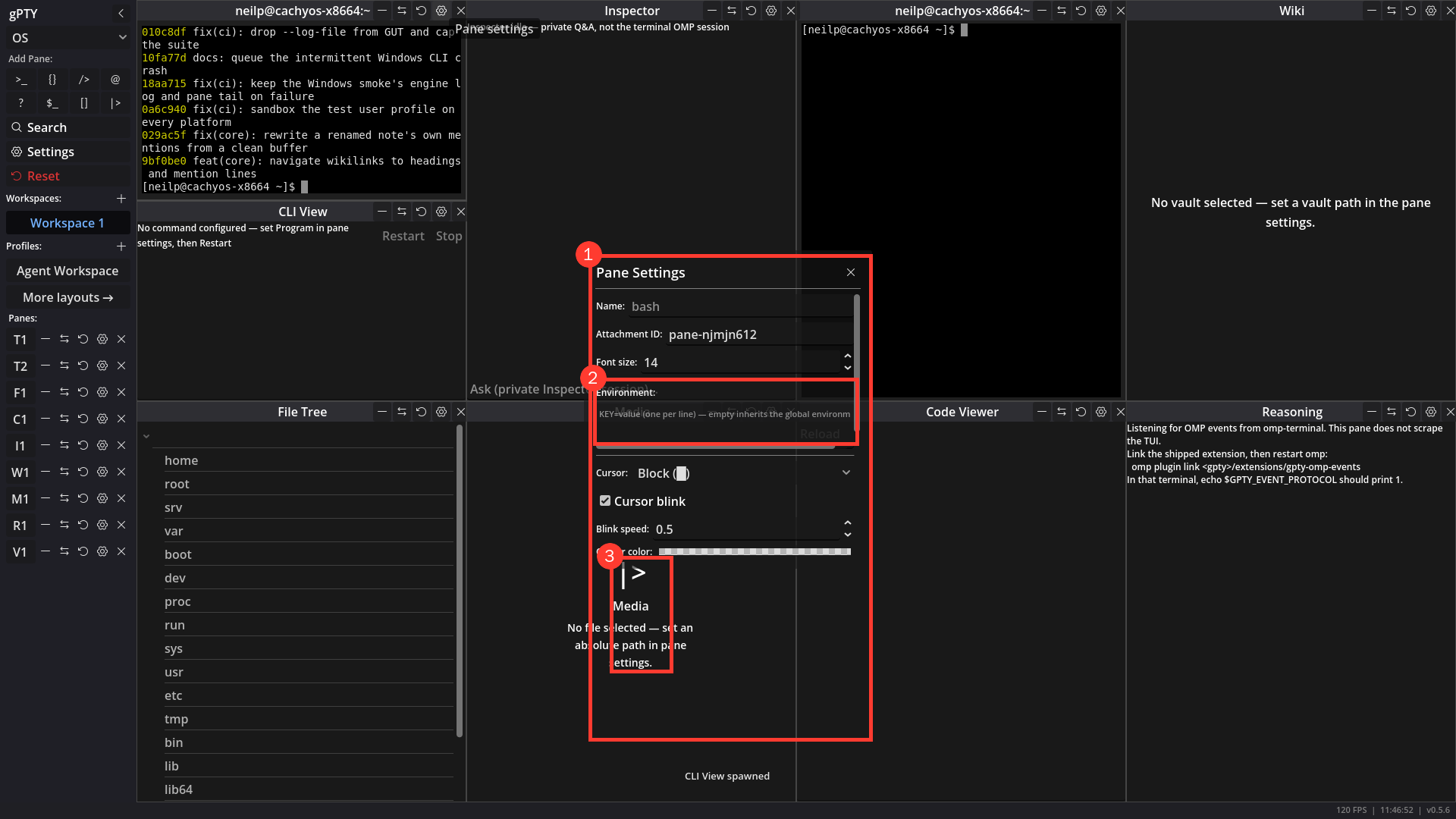
| ⬜ | GUI | Settings and Pane Settings are opaque and readable - both are bare Panels using Godot’s translucent default, so the pane behind bleeds through; the Environment TextEdit is one line with a horizontal scrollbar; the panel exposes an unexplained Attachment ID: pane-…. Fix: an opaque StyleBoxFlat, a minimum Environment height, a human label for the id (the public IPC handle), and a test that the topmost panel is input-picking and visually opaque. Screenshot (under Screenshots below): Pane Settings. |
| ⬜ | TERM | Scrollback can be deleted: clear a pane, delete closed-pane history, delete everything - code: scrollback is plaintext on disk (SECURITY.md) and the app has no way to remove it. HistoryStore::clear() deletes one pane’s rows but only a test calls it. The only deletion in the app is one sweep, 2 seconds after launch, of rows whose pane id is not open (prune_missing_panes), so a closed pane’s output stays on disk until the next launch. The lines table holds only the pane id, the line number and the text, with no timestamps. Fix, in order. (1) Clear scrollback and history for the active terminal, as a palette command (and what the v0.9.1 context menu’s Clear scrollback calls): it clears the pane’s on-screen scrollback and deletes its stored rows. Each pane’s writer thread queues lines for up to about 200 ms, so the clear goes through that writer or flushes it first, otherwise lines written just before the clear come back. (2) Settings → History: shows the store size (history_store_stats already reports it) and offers Delete history of closed panes now, which runs the launch sweep on demand, and Delete all history, which asks first, states how many panes and how much it will remove, and says that a live pane keeps what it shows on screen. (3) Closing deletes: an explicit GUI close of a pane (titlebar X, Ctrl+Shift+W, the palette, the sidebar) deletes its rows at once instead of leaving them for the next launch. Quit, a reset or layout load that restores panes under the same attachment_id, and a type swap do not delete, and the launch sweep still reclaims whatever is left. IPC killPane leaves its rows to that sweep too, so a program in a pane cannot erase history. The v0.9.1 workspace-restore item changes the whole-workspace close, whose rows are then kept for a bounded time. Not included: deleting by age for a live pane, which would need a timestamp on every stored line, and the per-pane line cap already bounds the size. None of it is reachable over IPC, the CLI or MCP. Tests: clear removes the pane’s rows and nothing else, and a line queued before the clear does not come back; the on-demand sweep keeps open panes; Delete all asks first and removes every row; an explicit close deletes while quit and a same-id restore do not; the empty-list guard in prune_missing_panes still holds. |
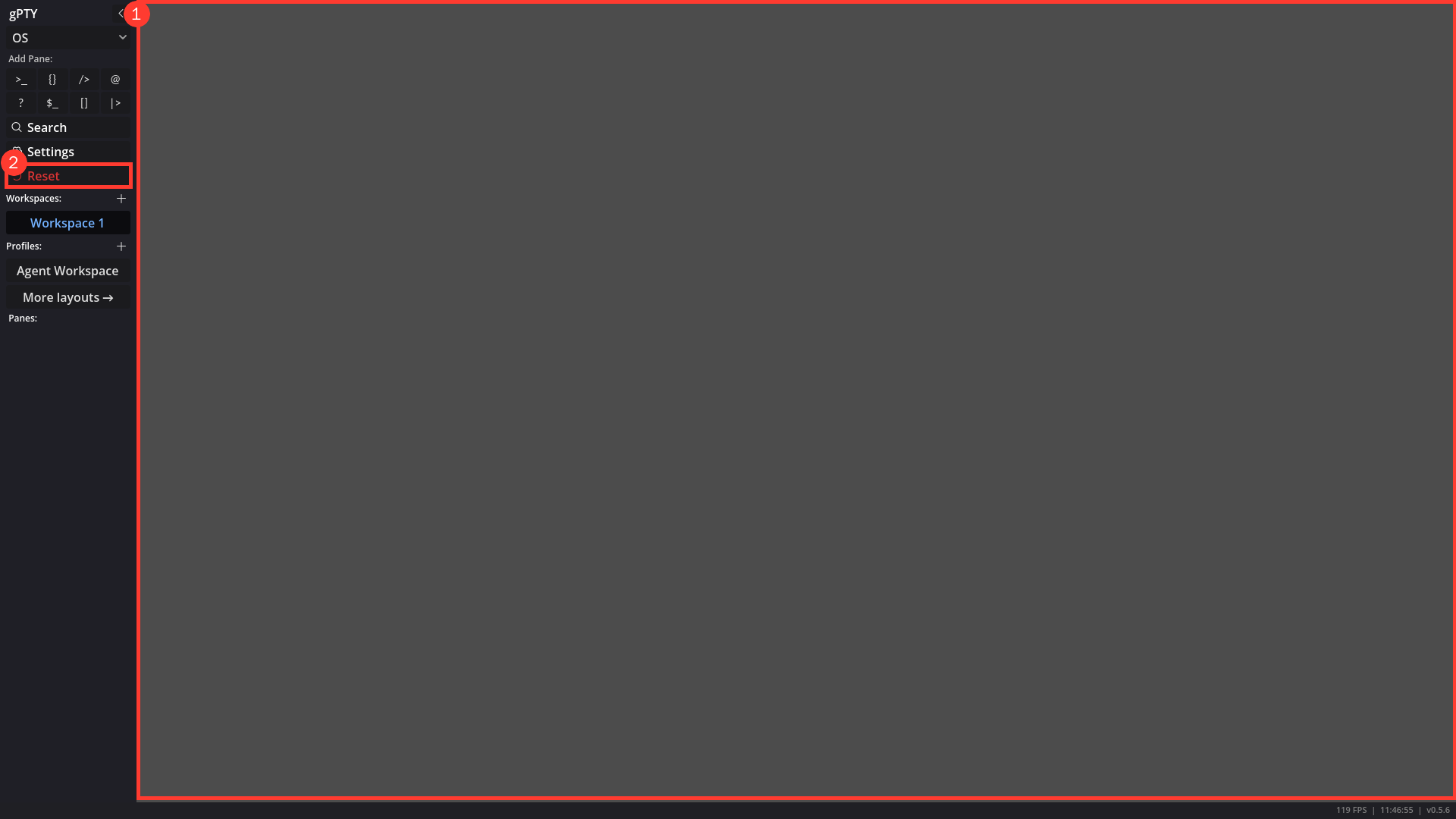
| ⬜ | GUI | An empty workspace has an intentional empty state - after Reset or closing the last pane the content area is Godot’s default rgb(76,76,76), matching nothing, with no guidance. Fix: set the project clear colour to the app background and show a centred “No panes - Ctrl+Shift+N for a terminal” state; keep it out of the way when tiles exist. Screenshot (under Screenshots below): Empty workspace after Reset. |
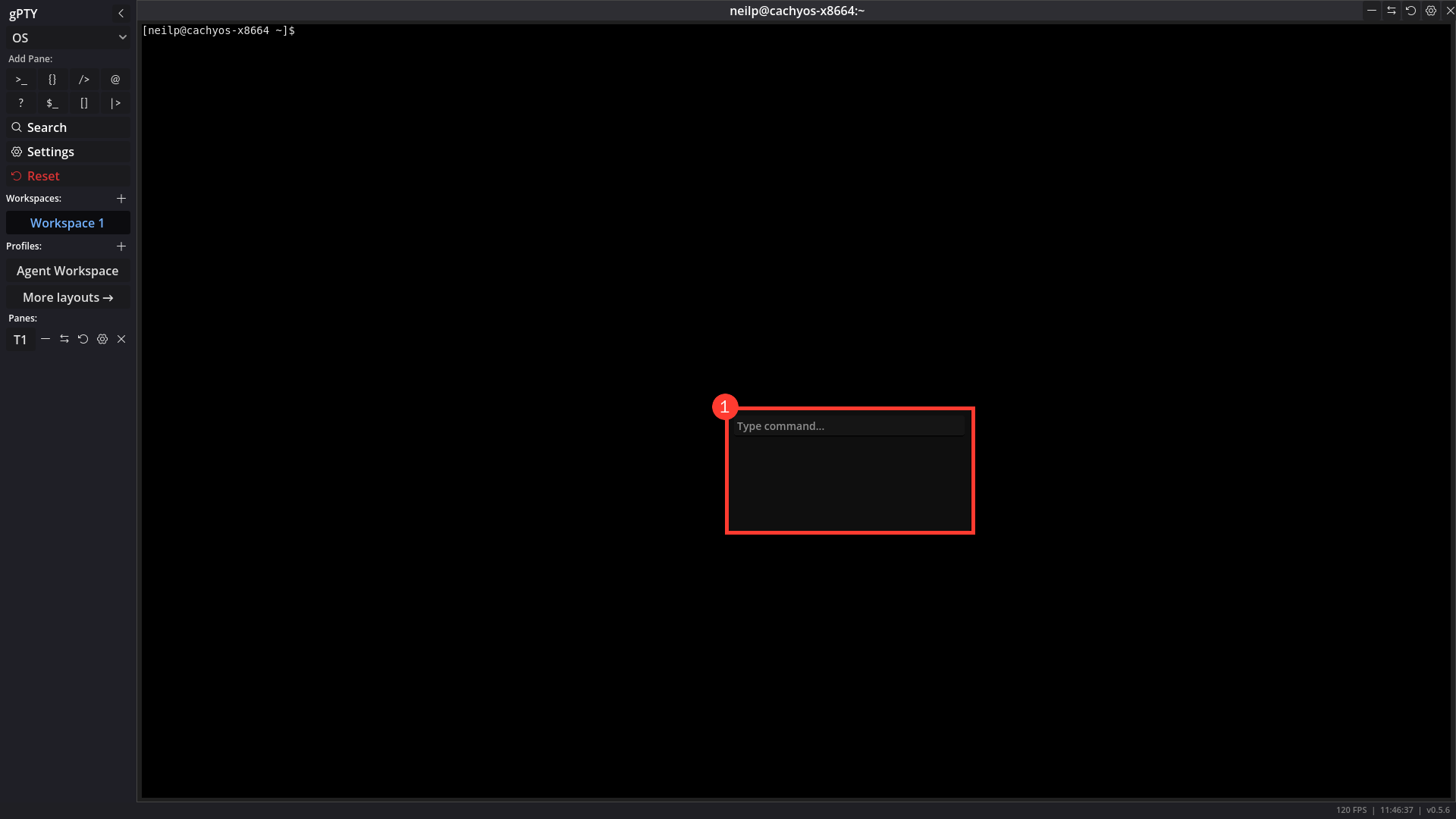
| ⬜ | GUI | Command palette: focus, population, Escape, selection and honest entries - _toggle_palette does _palette.find_child("*", true, false) as LineEdit, which returns the MarginContainer, so grab_focus() never runs; the list is empty until a key is typed; Escape does not close once the field has focus; Enter only runs the first match and there is no arrow-key selection; entries are raw lowercase strings with no shortcuts/icons, and include the developer command spawn 16 terminals plus ambiguous save/load. Fix: find the LineEdit by type, populate on open, handle Escape in the field, add up/down selection and Enter-on-selected, show shortcut hints, hide developer commands, and disambiguate save/load. Screenshot (under Screenshots below): Command palette on open. |
| ⬜ | GUI | Saved commands: insert or run a frequently used command from the palette - requested from daily use: the first thing typed after every launch is a cd into the project, and the only ways to avoid retyping it are shell history or an alias set up outside gPTY. Code: the palette (Ctrl+Shift+P) lists only new <type> and the fixed PALETTE_ACTIONS, and _execute_command matches those exact strings, so there is nowhere for a user to add an entry. Fix: a user-owned commands.json (the existing BasePersistenceManager store pattern, owner-only, closed schema: name, a one-line command of at most 1024 characters with no control characters, a run flag, at most 200 entries) managed in Settings → Commands (add, edit, delete, reorder) and from a Save command… palette entry. The palette shows them in a Commands section once the palette row above lands (focus, arrow selection, Enter on the selected entry, filtering by name); choosing one writes its text to the active terminal pane and sends Enter only when its run flag is set. run defaults to off, so a destructive command is never one stray click away, and cd entries are the ones people switch on. When the active pane is not a terminal the entries are disabled with a reason; they are never sent to another pane. Boundaries: GUI-local, with no new IPC method or CLI verb (so the sensitive-workspace rule stays trivially true), no plugin-supplied entries, no variable expansion, and not startup commands: running something when a pane spawns is the launch key below (A profile cannot ship a portable launch command, A pane’s launch command is honoured but no UI can set or see it), which project workspaces will also use, while this row is about a command you choose after launch. Tests: store sanitizing (control characters, oversize, duplicate names, the cap), the palette lists and filters saved entries, insert versus run writes the exact bytes to the active terminal and nothing else, and a non-terminal active pane is refused. |
| ⬜ | GUI | A profile cannot ship a portable launch command: omp update && omp needs a shell runner - the ecosystem profiles name a program per tile (command, or the legacy shell), but a command line with && needs a shell, and a shipped builtin cannot hardcode one: the Windows default shell takes /c while POSIX shells take -c (PaneTypes.shell_run_args, pane_types.gd:254-260, exists for exactly this and is already used by paneRun), and a hardcoded /bin/sh would also bypass the user’s configured shell. So “Agent Workspace runs omp update && exec omp” is not expressible in profiles.default.json today. Fix: a tile launch string (one line, ≤1024 characters, no control characters) expanded into the real program and argv by PaneTypes.shell_run_args(cfg_shell_command, ...) in ONE pure helper that also feeds tile_spawns_untrusted, tile_plan_key and untrusted_plan (pane_types.gd:57-124) and is applied before apply_settings in _restore_into (workspace.gd:972-1001), so the Workspace Trust approval covers the expanded plan and no second spawn path exists. command stays the direct-program field (no shell), launch is the shell line, and that helper is the only place the two meet. Boundaries: the string is passed verbatim - no variable expansion, no templating, no profile-global command - and a builtin may carry one only after the v0.7.1 cwd trust row is implemented, because it then runs inside the workspace directory - that row’s decided fix puts the directory into the approved plan exactly when a tile is untrusted, which a launch command always is. Tests: tile_plan_key and tile_spawns_untrusted change when launch changes; expansion is right for cmd.exe, pwsh and a POSIX shell; a tile carrying both command and launch has one defined winner; security.md gains the verbatim rule. |
| ⬜ | GUI | A pane’s launch command is honoured but no UI can set or see it - workspace.gd:996-1001 consumes command/shell plus shell_args, terminal_pane.gd:377-380 sanitizes the argv and pty.rs:414-421 spawns it, so the data path is live while the writers are not. Pane Settings gathers name, attachment id, font, env, cursor, rows/cols and colours only (terminal_pane.gd:1373-1393); Global Settings exposes the shell and env only; the one place a per-pane program can be typed is Save Profile’s “Pane commands” field, which writes shell alone and never shell_args (workspace.gd:2014-2038). The capability is therefore reachable only by hand-editing profiles.json/workspaces.json or by pane-run, with nothing telling the user that JSON editing is the intended path. Fix: a Launch command row in Pane Settings and the profile editor that reads and writes the launch key from the row above (never a third spelling), shows the inherited state when empty (runs the workspace’s shell), says that it applies to the next spawn and not the live shell, and uses the existing pane debounce/gather pattern (pane_settings_panel.gd:101-125). Keep it discoverable rather than hidden: a gate that exists to make a spawn safe is worth nothing if the only way in is hand-editing. Tests: the dialog round-trips an existing tile plan and clears it; an empty value keeps the plain shell; a profile saved from the dialog keeps the plan; the trust dialog shows the expanded program and string. |
| ⬜ | GUI | A pane can choose its own directory, with the workspace directory as the fallback - each workspace now owns one directory (workspace_store.gd:78-89 sanitizes it, workspace.gd:1003-1004 hands it to every terminal, terminal_manager.gd:63-78 and terminal_pane.gd:280 carry it to pty.rs:421-423), and that is exactly the wrong granularity when one profile is activated into two repositories: the pane that should start in the second repo has no say. Fix: a user-owned per-pane directory in a new user://pane_cwd.json (the PaneEnvStore pattern - BasePersistenceManager, owner-only, absolute-only and ≤4096, id-pattern key, empty means inherit, written only by Pane Settings), resolved in GDScript as pane override, then workspace directory, then gpty’s own directory. It must NOT be a tile field: the v0.7.1 cwd trust row’s acceptance is that a profile or plugin tile still cannot carry a cwd, and the v0.9.1 project-workspaces row states the directory is user-originated, never a profile or plugin field. The key cannot be attachment_id alone: ids are unique across all workspaces (workspace.gd:576-585) and a builtin such as omp-terminal reappears in every workspace that activates the profile, so an override pinned to repo X in one workspace would silently follow the profile into repo Y and defeat the workspace setting. Key it <workspace_id>/<attachment_id>, which needs a stable per-workspace id in workspace_store.gd:48-52 (entries are positional today and renames are allowed), generated on first load and backfilled on migration. Resolve the path in GDScript, not in Rust: lib.rs:250-269 drops an unusable cwd and the child then inherits gpty’s own directory, so a stale override would land in the wrong layer - instead warn once and fall back to the workspace directory, and apply the same existence check to a restored workspace path, which today is only validated when the picker sets it (workspace.gd:848-856) and silently degrades after a repo move. UI: a Directory row in Pane Settings with the existing directory picker (FILE_MODE_OPEN_DIR, workspace.gd:818-843) and a Use workspace directory action that clears the entry, showing the inherited value when empty; the debounce/gather pattern is terminal_pane.gd:1373-1393. Migrate the entry on an attachment_id rename the way env already does (workspace.gd:59-63), cap the store, and drop entries for deleted workspaces. It applies to the next spawn, not the live shell, and only terminal panes receive a cwd today (workspace.gd:1003), so decide explicitly whether cli_view follows. Tests: store sanitizing (relative, oversized, control characters, the cap); the same profile id in two workspaces keeps two directories; a rename carries the entry; a stale override warns and starts in the workspace directory, not gpty’s; a tile that carries cwd is still ignored. |
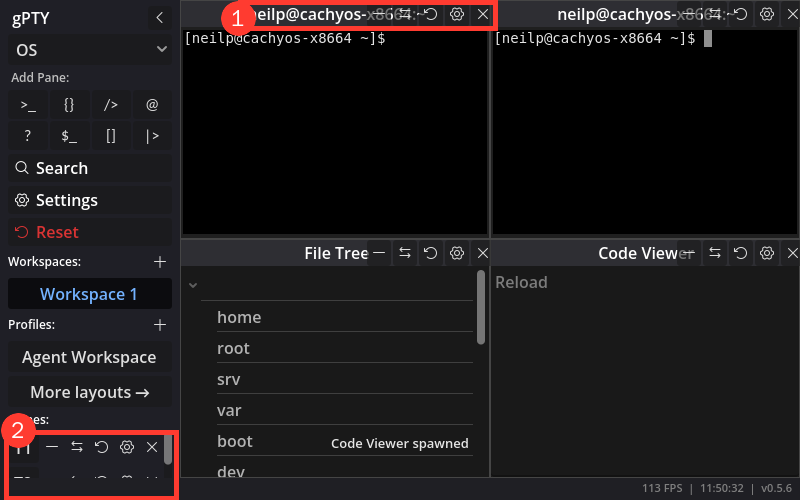
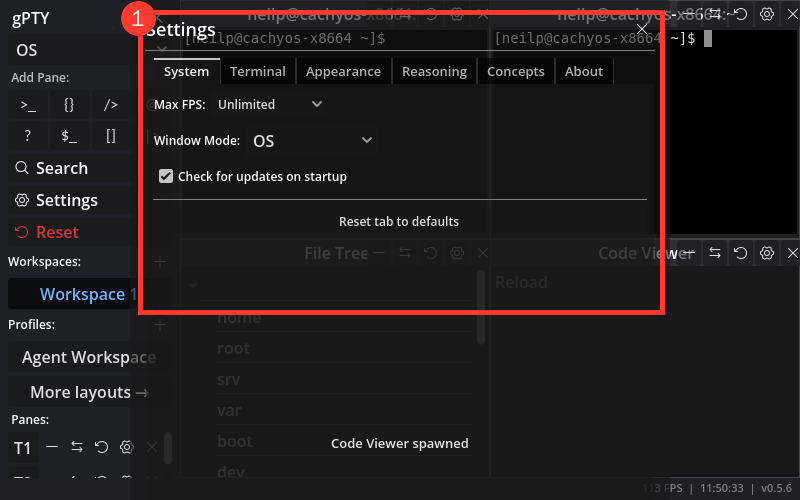
| ⬜ | GUI | Small windows adapt instead of clipping - At 800×500 the Settings panel spills over the sidebar; at 560×340 it is clipped and overlaps pane titles, pane titles run under their own buttons, and the sidebar pane list is cut after one row. Fix: size panels relative to the viewport, ellipsize titles, let the sidebar scroll as a whole, and add 800×500 / 560×340 layout assertions. Screenshots (under Screenshots below): Small window, 800×500 and Small window, Settings. |
| ⬜ | GUI | Resizing a pane is smooth: the resize cursor always shows, no gray band while dragging, no hop on release - three separate defects found together in the October 2026 usability pass, all reproduced against the v0.7.0 code. (1) The resize cursor goes missing after a drag. Verified: after dragging any divider, the cursor stays an arrow over some of the strips (on both axes) although the viewport’s hover target is correct, and it comes back after a click in any pane. Cause: while a drag is active Workspace._input consumes every mouse event with set_input_as_handled(), including the button release, so the viewport never sees the release of the press the edge strip started. Its mouse-focus state stays stale and it stops updating the cursor shape until some other press-and-release pair reaches it. Fix: end the drag on the release but let the release continue to the GUI, consuming only the motion (verified in a scripted run through Viewport.push_input: with that change the cursor is correct over every strip after the drag). The release reaches only the strip that took the press, and end_edge_drag is already a no-op by then. (2) A gray band shows while dragging. Verified from captured frames: a terminal fills its whole rectangle with default_bg, Color(0.12, 0.12, 0.12), while its cells use the engine’s own default background (black, with no colour scheme selected), so the area the pane has grown into shows (31,31,31) beside (0,0,0) cells. The grid only reflows after RESIZE_DEBOUNCE (50 ms) with no further size change, which never happens mid-drag, and the old grid stays centred in the new rectangle until then. Fix: fill with the same colour the cells use (the engine’s default background, or the selected scheme’s), so the margin is invisible; and replace the quiet-period debounce with a throttle while a drag is active (about 10 reflows a second, one final reflow on release), so the text follows the divider the way other terminals do, without a window-size signal to the shell on every motion event. (3) The divider hops on release. The preview follows the pointer in pixels and the release rounds to one of 60 grid units, up to half a unit away, about 13 to 16 px across a 1920 px window. Fix: round the preview to units while dragging, so what is shown is what is committed. Also in this item: the strips are 6 px wide inside a 1 px border on each pane, so a divider has a 2 px dead band between two strips and a 14 px target in all. Replace the per-pane strips with one handle per divider line, wider than that and without the dead band, with a hover highlight on the divider, which stays visible even where the platform’s cursor fails to change. Tests: a viewport-driven GUT test that presses, moves and releases and asserts the strip received the release and that no drag state is left behind; a frame-capture test that no pixel in the exposed margin differs from the cell background during a scripted drag (a magenta sentinel behind the grid also proves that no gap opens between panes); a preview-equals-commit assertion; and a manual check of the cursor on a windowed run, since the headless display driver has no cursor. |
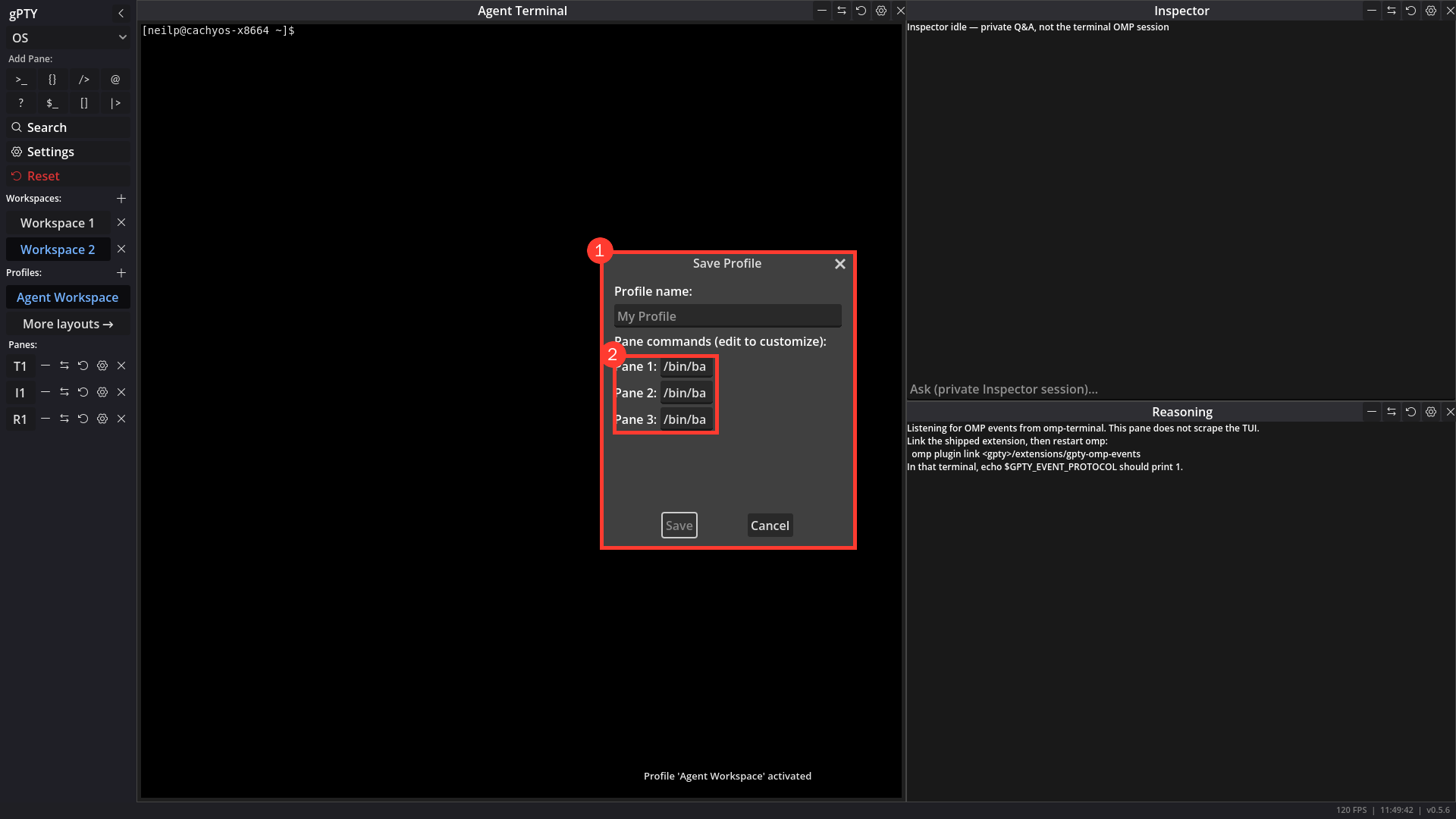
| ⬜ | GUI | Dialogs and profile forms match the app - ConfirmationDialog/AcceptDialog constructions render in stock Godot grey; Save Profile clips command fields to /bin/ba and says “Pane commands (edit to customize)”. Fix: theme Window/AcceptDialog/ConfirmationDialog (largely free after the shared theme), widen the fields, and replace the jargon. Screenshot (under Screenshots below): Save Profile dialog. |
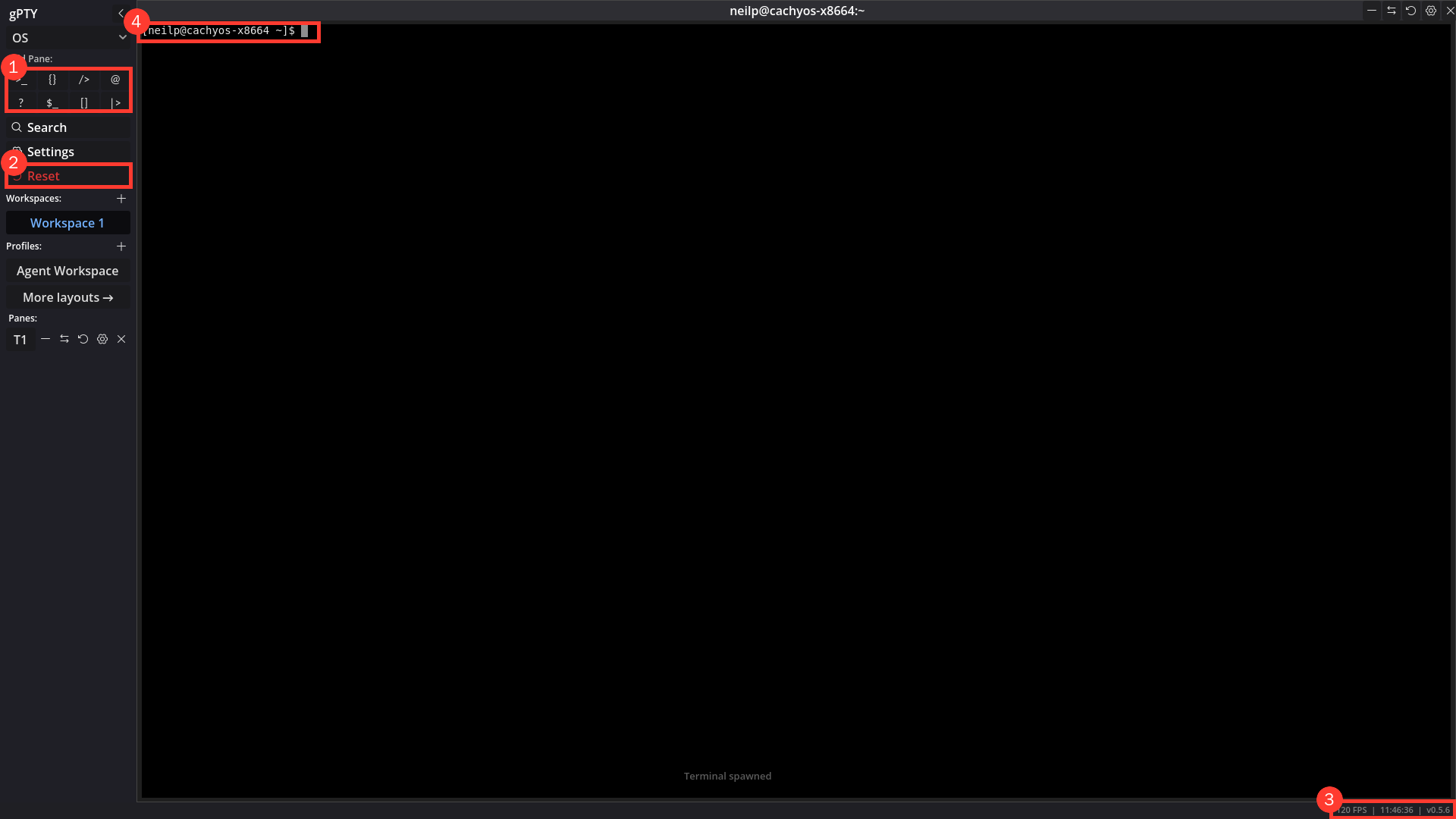
| ⬜ | GUI | Discoverability: pane names, shortcuts and the window-mode control - “Add Pane” is a grid of glyphs (>_ {} /> @ ? $_ [] |>), with names visible only in tooltips; the top dropdown reads only “OS”; Ctrl+Shift+P and most shortcuts appear nowhere in the UI. Fix: show names beside icons (or a first-run hint), label the window-mode control with what the values do, and add a shortcuts list under Settings/About. Screenshot (under Screenshots below): First launch. |
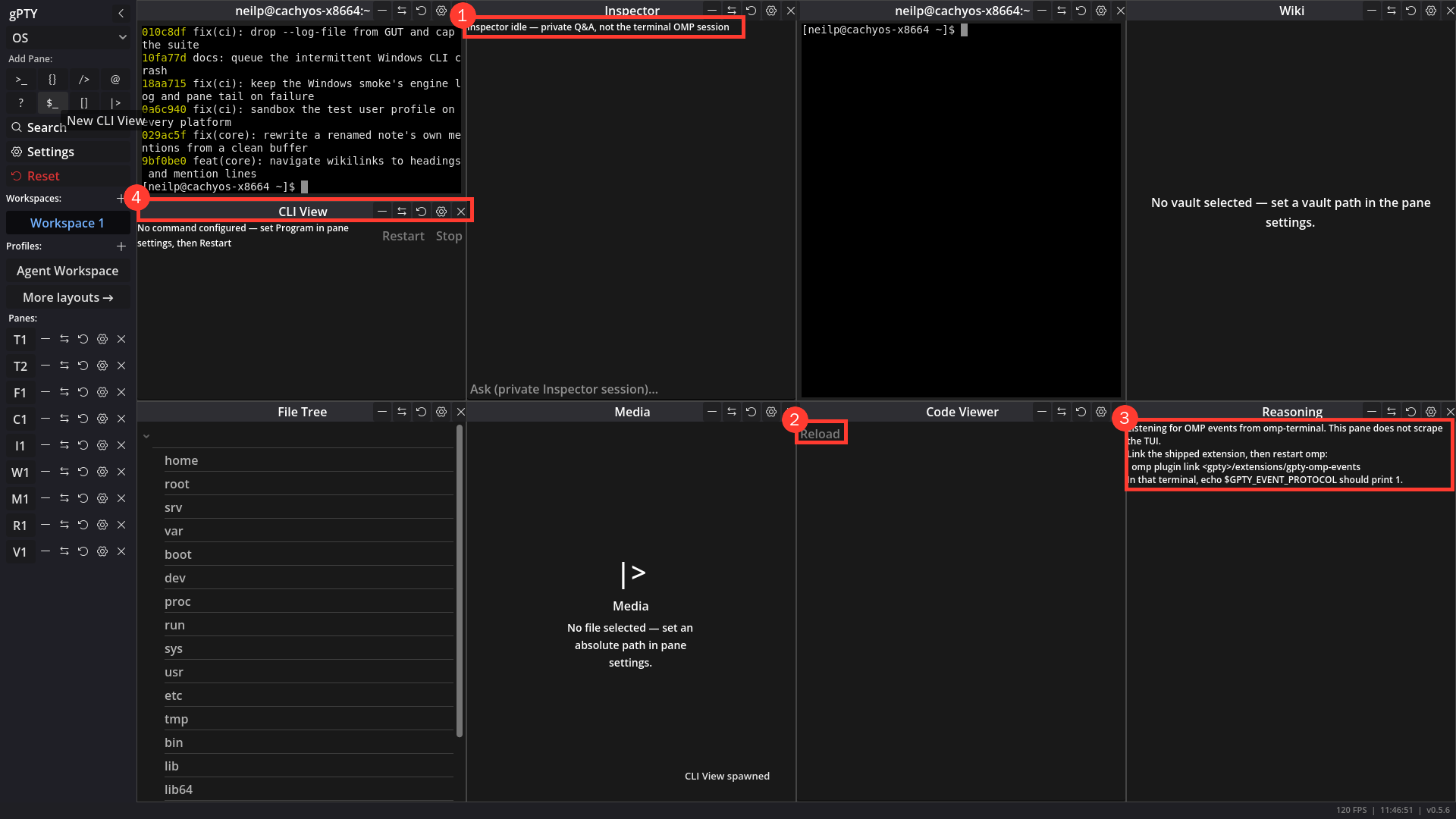
| ⬜ | GUI | Pane chrome: distinct icons, a compact action menu, padding and consistent empty states - the same counter-clockwise arrow means Reset (destructive), Change pane type and reset-to-default; every pane row carries five 24×31 px buttons duplicated in its title bar, and the type-swap menu does not mark the current type; Inspector/Reasoning/Code Viewer text touches the pane edge and Code Viewer’s empty state is a faint “Reload” while Wiki and Media explain what to do. Fix: distinct icons, keep close/settings visible and move the rest into a menu that marks the current type, add inner padding, and use the Wiki/Media empty states as the model. Screenshots (under Screenshots below): Pane padding and empty states. |
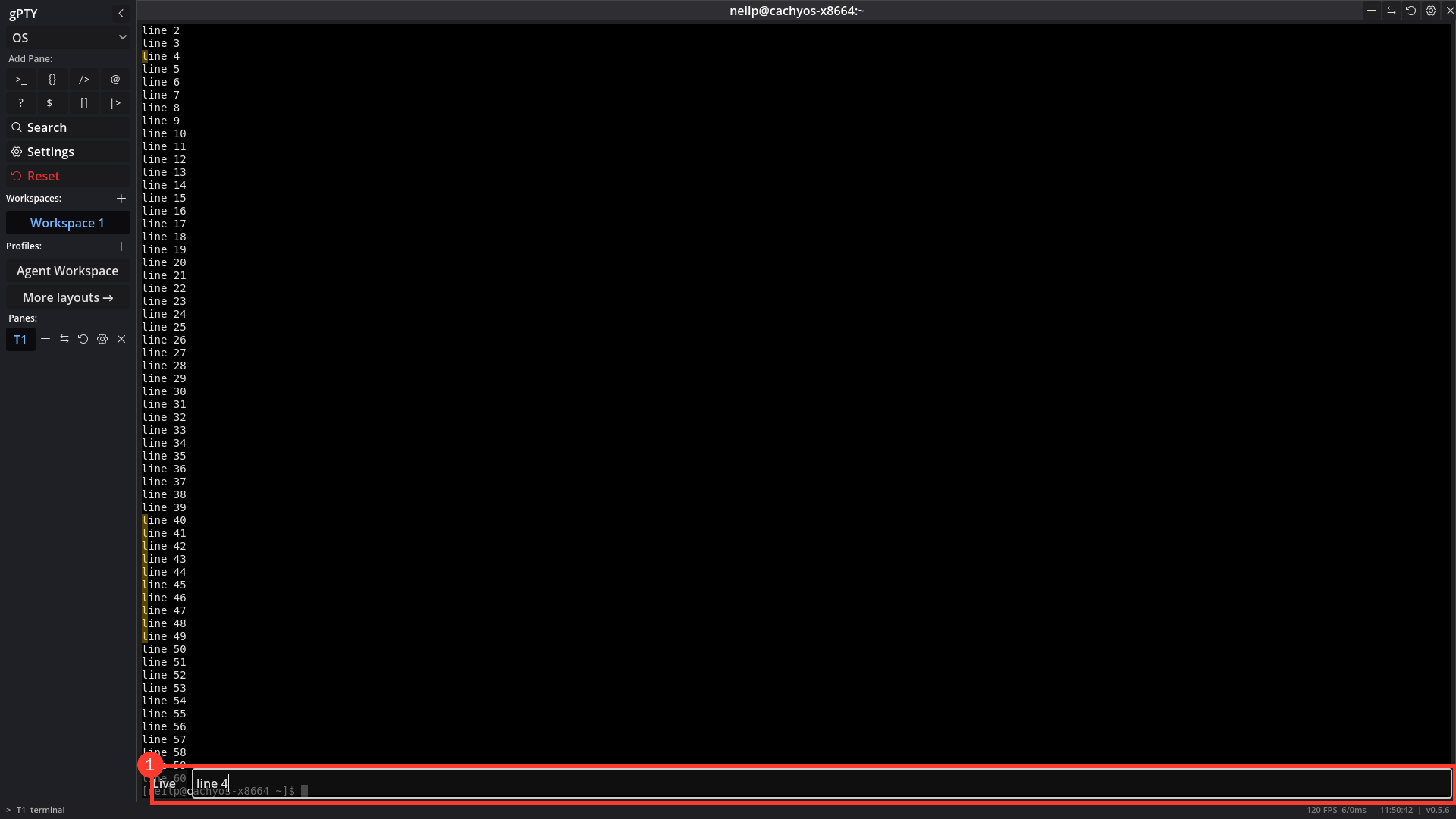
| ⬜ | GUI | Search, toasts and appearance swatches - the search bar covers the prompt line and shows no match count or next/previous controls; toasts are faint and mostly state the obvious (“Terminal spawned”); unchecked Appearance colours render as unexplained checkerboards. Fix: move the search strip off the prompt, show n/m with next/previous, make toasts legible and suppress no-op messages, and give unset swatches an “unset” label/tooltip. Screenshot (under Screenshots below): Search bar. |
| ⬜ | TERM | A scrolled-back pane returns to live output in one click - requested from daily use: after scrolling up to find or select something, the only ways back are PageDown or a wheel scroll in the exact amount, typing (which also sends input and snaps), or overshooting; the pane only draws its position ([Scroll: N/M lines], terminal_pane.gd) and there is no control to click. Fix: a floating chevron anchored bottom-right, shown only while get_scroll_offset() > 0, that calls _snap_to_bottom() on click. It is an actual Button child, not a draw-pass hot spot, so Godot’s picking delivers the click before _handle_mouse reaches its mouse-reporting branch - the arrow stays pane chrome even in a TUI that owns the mouse (the search bar’s rule) - and it must not take focus or send input. The grid-owned selection must survive the jump (the highlight moves with its text and copy still works), and the existing scroll indicator stays the position readout rather than being replaced by the button. Tooltip names the effect; Ctrl+End parity can ride the configurable-keybindings item in v0.9.1 if wanted. Tests: a GUT probe for show/hide against the scroll offset, click resets the offset with the selection intact, and a pane with DECSET 1000/1002/1003 mouse reporting still handles the click locally; manual pass in a plain shell and in a mouse-aware TUI. |
| ⬜ | GUI | The sidebar offers a feedback path that opens a prefilled GitHub issue - the repo asks users to report through GitHub Issues (ROADMAP.md), but nothing in the app links there and a blank form leaves the user reconstructing version, OS and context by hand - the friction that keeps the issue tracker empty. Fix: a Feedback button as the last sidebar action, directly below Close All (sidebar.gd), that opens https://github.com/godot-pty/gpty/issues/new through OS.shell_open with a URL-encoded title and body template: what happened, what was expected, steps to reproduce, and an “About this build” block carrying only GptyTerminal.get_app_version(), OS.get_name() plus version and the window mode. The user reviews and edits the body on GitHub; nothing is auto-submitted, and the app makes no network call and holds no token. Privacy: never prefill pane output, command text, selected text, paths, environment values or logs (the v0.7.1 logging item’s list), and keep the URL under a tested cap with a “Copy issue text” fallback plus a toast when shell_open cannot open a browser (offline, headless, no default handler). Do not rely on labels= (GitHub ignores it for users without write access). Tests: a pure body builder (version/OS injected, URL-encoded, no paths, capped) asserted without a browser, a sidebar-order test (below Close All) and a shell_open seam for the click; no issue templates exist today, so the prefill is the whole form. |
| ⬜ | DOCS | The README’s persistence and shipped-preset paragraphs describe v0.4 - godot/README.md still says “Layout is auto-saved on close and auto-restored on startup via user://layout.json” (the store is WorkspaceStore’s user://workspaces.json, one named pane set per workspace, and layout.json survives only as a one-shot legacy import), and the paragraph below it says five ecosystem presets (herdr, lazygit, nvim, claude, OMP) “ship alongside” the built-ins, while v0.5 moved them to plugin repos - profiles.default.json ships only Agent Workspace and Knowledge Base. Found 2026-10-26 while adding the profile row’s new-workspace action (the bullet added there is correct; these two paragraphs were left as they were rather than silently rewritten). Fix: rewrite both against WorkspaceStore, ProfileManager and profiles.default.json, and re-read the rest of the page for the same drift. |
| ✅ | GUI | A profile opens in its own workspace from its sidebar row - reported from daily use: clicking a profile always replaced the active workspace’s layout, so keeping two profiles side by side meant creating an empty workspace first and then re-finding the profile. The row now names both destinations: the label still activates in the active workspace (and still asks before replacing panes), and a trailing arrow-square-out glyph opens the profile in a new workspace. The new tab is named after the profile and a second one gets " 2" (WorkspaceStore.unique_name, suffix applied after the 32-character cap so the loop cannot stall on a full-length name); it inherits the active workspace’s cwd, is switched to before the restore so the reset/restore run against that tab, and is refused at MAX_WORKSPACES (8) before the trust prompt so nobody approves a profile that cannot open. No replace confirmation on that branch (nothing live is lost), and the Workspace Trust dialog carries open_in_new through, so an approval cannot redirect the click to the other destination. The two sidebar signals (request_profile, request_profile_in_new_workspace) stay separate: one click never fires both. Tests: test_profile_row_offers_both_destinations_as_separate_actions, test_plugin_profile_row_shows_provenance_without_delete (plugin rows keep the glyph, still no delete), test_profile_opened_in_a_new_workspace_leaves_the_current_one_alone (tiles, cwd, accent, grid visibility, duplicate naming), test_profile_opened_at_the_workspace_cap_is_refused, test_unique_name_suffixes_keep_the_length_cap. Smoke: the real main scene driven headless through the sidebar buttons - the glyph adds exactly one workspace named after the profile with its three tiles while workspace 1 keeps its pane, a second click yields “Agent Workspace 2”, and the label still raises the replace confirmation. |
| ⬜ | GUI | Extend the assessment to the surfaces it did not cover - the report did not examine the vault graph view, the concept graph editor, the Wiki pane with a real vault, the plugin review/trust dialogs, keyboard-only traversal/focus rings, screen readers/colour-blind use, real OS window resizing, 4K/HiDPI, or Windows/macOS window behaviour. Cover the app-local surfaces here (graph, concept editor, wiki, trust dialogs, keyboard traversal) and carry the platform/display half into the release’s verification; add findings to this section rather than losing them. |
| ⬜ | GUI | Close the loop: recapture the assessment on the 0.8.0 build - run the same sandbox/synthetic-input method and save the new captures under docs/static/images/ (the finished UI as release screenshots, v0.8.0_<n>.png; any finding that is still open or newly found as issue-v0.8.0-<slug>.png, listed under Screenshots on this page; findings and outcomes go in the rows, not in a separate report); every finding must be closed or explicitly deferred with evidence, and the new capture is the release’s visual record. |
| ⬜ | BUILD | The release screenshot script captures a doomed second instance when a GUI is running - scripts/screenshot-gpty sandboxes XDG_DATA_HOME/XDG_CONFIG_HOME but not XDG_RUNTIME_DIR/GPTY_SOCKET, so when a live GUI owns the socket the sandboxed app refuses the bind and renders “Another gPTY window is already running - this one will close.” instead of the app. The v0.6.0 capture hit exactly that; the workaround was an outer private XDG_RUNTIME_DIR + GPTY_SOCKET + cleared GPTY_SECRET. Fix the script to create and export its own runtime/socket sandbox (the gut-check pattern), so a release capture never depends on the developer’s desktop state. Found 2026-10-19 while capturing the v0.6.0 screenshot. |
| ⬜ | CLI | A just-written test program can fail to spawn with ETXTBSY - cli::process_tests::spawn_refuses_a_program_another_user_could_have_written writes a shell script, chmods it, then spawns it; on the CI run for 0ff246b the control spawn failed with Text file busy (os error 26) while the refusal case passed, and the same job passed on rerun. The kernel reports ETXTBSY while any process holds the file open for writing; the test’s own fs::write has closed, so the window is the kernel’s exec-vs-write race (or a leaked descriptor). Fix direction: a unique temp name per test and a bounded retry of ETXTBSY around the test’s spawn only - the product must keep reporting the error. Not user-facing. |
| ⬜ | BUILD | One command installs it - every install today is “download a 43 MiB tarball, extract it, find gpty-gui.sh, remember where the folder is”. Fix: install.sh (POSIX sh, set -eu, no bash-isms, because the script is piped into a shell and may assume nothing beyond that) that resolves the release (latest redirect, or GPTY_VERSION), downloads the archive and SHA256SUMS, verifies the sum (sha256sum -c --ignore-missing), extracts to ~/.local/share/gpty/<version>/, symlinks gpty and gpty-gui into ~/.local/bin, prints the PATH line and the shell profile to add when that directory is not on it, and re-runs as an upgrade (same version = no-op, older = replace the symlink, the old directory stays until --prune). Published as a release asset so https://github.com/godot-pty/gpty/releases/latest/download/install.sh is always the script of the release it installs, and mirrored at gpty.dev/install.sh from the Pages build; macOS installs ~/Applications/gPTY.app and the CLI beside it, and curl writes no com.apple.quarantine xattr, which is why this path runs an unsigned build while a browser download of the same build does not. Windows is install.ps1 (extract to %LOCALAPPDATA%\gpty, user PATH entry) and is second priority: winget is the better Windows answer and lives in v1.0. Verified by running it on a fresh container against the last release and by installing twice (idempotence) and one version back (upgrade). Owner decision 2026-10-25: next minor release. |
| ⬜ | BUILD | The CLI finds a GUI that a package manager installed - find_gui_binary searches only the CLI’s own directory (gui_candidates, daemon.rs:427), the macOS .app under /Applications and ~/Applications, plus the explicit GPTY_GUI override. That covers the tarball (which ships both halves side by side) and nothing else: winget, Homebrew, the AUR and cargo install gpty each put the CLI and the GUI in unrelated directories, and Windows compares the literal name gpty-gui, which never matches the shipped gpty-gui.exe, so gpty daemon start cannot find the GUI on Windows at all. This is the prerequisite for every distribution channel below and for the registry entry: an MCP client launches a CLI with no GUI beside it. Fix: add PATH to the candidate list (after the bundle siblings, which are the exact version that shipped) and carry the platform’s executable suffix in the names; GPTY_GUI stays the explicit override and launchable keeps rejecting relative, world-writable and non-file candidates. Tests: PATH hit, sibling precedence, and the suffixed name. |
| ✅ | BUILD | The MCP registry entry names a package that can be installed - the official registry (server.json + mcp-publisher) is where MCP-client users browse for servers, and gPTY ships an MCP server (gpty mcp, 22 tools). server.json declares io.github.godot-pty/gpty, version-synced with crates/gpty-cli, as a cargo package, with packageArguments mcp so a client runs gpty mcp rather than a bare gpty; the crates.io ownership token is visible text in crates/gpty-cli/README.md (crates.io strips HTML comments, so the hidden-comment form the docs use for PyPI/NuGet does not verify). scripts/mcp-registry check validates it offline in ci-check. Published 2026-10-26 (run 40373452936) after gpty 0.7.0 reached crates.io: read back from registry.modelcontextprotocol.io/v0/servers?search=io.github.godot-pty, the entry is active/isLatest and stores the descriptor as written - cargo package gpty 0.7.0, the mcp positional argument, the website at gpty.dev. Later releases publish themselves: .github/workflows/mcp-registry.yml runs on release: published over OIDC (no secret), refusing to run when server.json does not name the released version or the crate is missing from crates.io. |
| ⬜ | BUILD | The MCP entry installs without a Rust toolchain - the entry names a cargo package, so an MCP client can only start gpty mcp after rustup and a C compiler have built the CLI. An mcpb package removes that: a bundle carrying the three platform CLIs plus a manifest.json (server.type: binary, mcp_config.command per platform through platform_overrides), published as a release asset and described in server.json with its fileSha256 (the registry requires the hash, and the bundle URL must contain “mcp”). Two constraints: the bundle carries the CLI only - the desktop app still comes from the release archives, so the entry’s text has to say so - and the CLI must find a GUI installed elsewhere, which is the row above. Verification: install the bundle in a client on a machine with no Rust toolchain and run list-panes against a running GUI. |
| ⬜ | PROJECT | The entry is discoverable where people actually browse - the official registry is machine-readable; humans search aggregators. Find which ones ingest the registry automatically (PulseMCP, Glama, mcp.so, Smithery) and submit to the rest, and open one PR to awesome-mcp-servers - same descriptor, no new claim to make. Free, permanent, and aimed at people already looking for exactly this. Verification: the listing URLs, recorded here. |
| ⬜ | DOCS | Demo videos: one per workflow, not one hero GIF - the README’s 704 KB demo-hero.gif shows a script driving panes. It proves the API and shows no reason to install: a visitor cannot see why anyone would want panes to be drivable. Needs several short captioned videos, each one workflow end to end (parallel agents with state badges; pane-run + pane-wait as a build loop; a concept capturing output into an adjacent pane; the bundled wiki vault), recorded from scripts/record-demo against a seeded sandbox workspace, with one OMP-specific cut for the OMP community. Not started by decision (2026-10-25): which workflows, their length and the seed workspace still need discussing before any recording. |
| ⬜ | DOCS | A first technical post exists to point at - SignPath’s open-source signing programme is on hold for exactly this: it wants articles or posts that establish the project, and nothing published so far is longer than a release note. The post to write: one real workflow end to end (four agent panes, a state badge calling for attention, that pane’s status read and answered through paneStatus/pane-read), the same actions as the CLI and MCP calls a reader can copy, what the concept engine does and does not do (display only, it never types into a shell), and a short honest status paragraph (side project, LLM-assisted, unsigned binaries, install path). It shows only behaviour that exists on a tagged build - no roadmap promises - and the commands it records become the script for the demo-video row, so both ship from one sitting. Not drafted yet (owner, 2026-10-25): draft it together with the recording and the seed workspace, then point SignPath at the published URL. |
| ⬜ | PROJECT | A release announces itself - every release is announced nowhere; promotion is a manual act that has already been skipped for fourteen tags. Fix: an announce workflow on release: published that posts the changelog page for the tag to r/gPTY (the subreddit stays as the community channel) with the release link and the demo cut, the body generated from docs/content/docs/changelog/v<version>.md so an announcement cannot disagree with the release notes, and the Reddit credential (script app: client id, secret and refresh token) held as an Environment secret restricted to release tags, per the registry workflow’s secret-handling rule. Failure must not fail the release: the release is published before the post is attempted, so the job reports and can be re-run by hand. |
| ✅ | GUI | A wiki pane reopens the note and graph it was showing - the pane’s saved state held only the vault and the view mode, so every restart, layout load and workspace switch dropped the user back at the note list. The layout now also carries open_note (a vault-relative path, opened through the same gate as any other open) and graph; both are replayed once, at spawn, and ignored by the settings panel’s re-apply, so editing a font size never navigates; a note that was deleted leaves the list, not a broken view. Unsaved text is not saved (the recovery copy covers a crash). Tests: layout state, spawn-time restore, re-apply is inert, missing/oversized/mistyped values. It also lets the demo recordings seed a wiki pane without a click. |
| ✅ | DOCS | The README and docs home show a scripted demo, not a screenshot - scripts/record-demo hero|tour launches a sandboxed gPTY (own data dir, HOME and IPC socket), seeds a workspace, drives it with the gpty CLI the way an agent would, records the window with ffmpeg and burns in captions; output is docs/static/images/demo-{hero,tour}.{gif,mp4,webm}. The README embeds the GIF; the docs home plays the WebM/MP4 through a video shortcode (raw HTML is disabled). It simulates no keyboard or pointer input. Re-record it when the UI changes. Found while building it: a pane strips GPTY_SOCKET, so a CLI typed into a pane reaches whatever owns the default socket; the script exports it from the sandbox’s .bashrc so a recording can never drive a real session. |
| ✅ | BUILD | The knowledge base ships inside release builds - the vault at docs/content/wiki was repository-only, so a downloaded bundle had no copy of it. scripts/build-wiki now packs the notes into godot/knowledge.json (52 notes, content hash), the exporter includes it, and KnowledgeStore seeds it into user://knowledge/ under the content hash on first use; the built-in Knowledge Base profile opens that copy with the wiki pane through the @knowledge token, so no machine path is stored. A changed bundle seeds a new hash directory instead of overwriting local edits; the source vault stays authoritative (scripts/build-wiki --check in CI, scripts/build, and the release export). Tests: GUT bundle/seed/index/graph, pane-token and shipped-profile tests. |
v0.8.1 - Terminal Fidelity
Probes run against a sandboxed v0.6.0 build (commit b8bf5f9) with the same synthetic-input + viewport-capture method as the UX audit (AGENTS.md, “UI/UX assessment method”), plus a read of the emulator’s event path in crates/gpty-core/src/term.rs. Each item is marked verified (reproduced in the running app), code (read in the source, not run) or not tested. The probe scripts are scratch files and are not committed - the “Fidelity regression suite” item below turns them into one. The theme: gPTY’s differentiator is its control surface, but a daily driver is judged first on whether htop, nvim, lazygit and ssh look and behave right, inside the user’s own shell. Almost everything here is something the emulator already knows, or the OS already told us, and gPTY drops - or a wrong default that hides it. The release sits after v0.8.0 (the theme work, so the fidelity fixes are not themed twice) and deliberately before v0.9.0: the grid wire protocol reuses TermGrid’s packed flat arrays as the wire format, and the cell carries no strikeout/dim/undercurl bits today, so widening it after the format is frozen is a protocol revision, while before it is a struct change. Boundary rules hold throughout (AGENTS.md “ADE Architecture Boundary”): everything here observes and displays; nothing interprets terminal output into an action, every terminal reply stays a fixed template, and every new OSC consumer is bounded, sanitised and display-only unless its item says otherwise.
| Done | Area | Item |
|---|---|---|
| ⬜ | TERM | The default shell is the user’s shell, not /bin/bash - verified: on a machine whose login shell is /bin/fish ($SHELL and getent passwd agree), every pane ran bash (ps -p $$ -o comm=), so the user’s prompt, aliases and plugins were missing with no hint why. SettingsManager.default_shell_command() returns the literal /bin/bash on every non-Windows platform; on Windows it returns %COMSPEC%, i.e. cmd.exe, which is not what a Windows user opens a terminal for. Fix: resolve the fresh-install default from $SHELL, validated by the same rule validate_executable applies (absolute path, regular executable file), falling back to /bin/bash then /bin/sh; on Windows prefer pwsh.exe, then powershell.exe, then %COMSPEC%, found by absolute path. Settings → Terminal lists the detected shells (including installed WSL distributions) as choices beside the free-text path, and shows what the default resolved to. A saved shell_command is never overwritten. Two knock-on points to handle in the same item: the GUT suites that rely on default_shell_command() for a POSIX shell (AGENTS.md “Testing”) stop being bash-by-construction, so they must pin a POSIX shell through a fixture helper; and the Workspace Trust comparison is made against the user’s configured default, so confirm a built-in or plugin profile that names no program still never prompts. |
| ⬜ | TERM | A pane whose shell has exited says so and offers Restart or Close - verified: after exit the pane stays on screen with a cursor and no message, and gpty list-panes still counts it, so a crashed shell, a dropped ssh or a finished command looks like a hung pane. The exit code is already tracked (TermStatus.exit_code, paneStatus) but never shown. Fix: when the child has exited, draw an unobtrusive footer (“Process exited (code N) - Enter to restart, Ctrl+Shift+W to close”) from the status the engine already reports; Restart re-spawns the pane’s own spawn plan (program, args and the user’s own per-pane env) through the same validate_executable path and keeps the pane’s attachment_id; a Settings choice On exit: keep / close (default keep, so scrollback stays readable). Tests: exit 0 and non-zero, Restart re-runs the same plan, and the pane list and IPC state agree in both. |
| ⬜ | TERM | Text attributes the emulator parses are drawn: strikethrough, dim, hidden, curly/dotted/dashed/double underline and underline colour - verified: in a probe row of ESC[1m (bold), [3m (italic), [4m (underline), [4:3m (curly), [9m (strike) and [2m (dim), bold, italic and underline render and the other three do not. Cause (code): CellInfo in term.rs carries only bold/italic/underline/inverse/wide, so alacritty’s strikeout, dim, hidden and underline-variant flags (and the SGR 58 colour) are dropped before the packer and the GUI never sees them; the exact flag set to carry is confirmed against alacritty_terminal’s Flags at pickup. These are not exotic: nvim draws diagnostics with undercurl, and many CLIs use dim for secondary text and strike for removed lines. Fix: replace the bool fields with a small attribute bitfield packed into the existing flat arrays (no per-cell Dictionary, per the AGENTS.md rendering note), thread it through the renderer-facing packer and terminal_pane.gd’s run batching (a run breaks on an attribute change, as it already does for underline), and draw strike as a rect, dim as the blended foreground, and undercurl as a pixel-aligned zig-zag. Must land before v0.9.0’s grid wire protocol freezes the packed layout. Tests: a pixel diff against the current render for plain text and the three working attributes (the v0.5.3 batching technique), plus one assertion per new attribute. |
| ⬜ | TERM | Box-drawing, block and braille characters are drawn by gPTY, not taken from the font - verified: ┌─┐│└┘ renders at the default 14 px with visible gaps and a missing corner; block elements and braille are the same class. Font glyphs for these ranges are sized to the font’s advance and ascent, not to the cell, which has a fractional pixel size, so neighbours neither join nor tile. htop, btop, lazygit, tmux borders and every TUI frame are built from them. Fix: draw U+2500–U+257F (box drawing), U+2580–U+259F (blocks) and U+2800–U+28FF (braille) procedurally as pixel-snapped rects in the cell’s own rect, the approach Alacritty and kitty take, bypassing the font and leaving the text-run batching untouched for everything else. Powerline separators rendered correctly from the bundled DejaVu Sans Mono in the probe and stay font-drawn. Tests: a golden-pixel assertion that horizontally adjacent ─ and vertically adjacent │ cells meet with no gap at several font sizes, including fractional cell sizes and the UI scale from the v0.8.0 theme item. |
| ⬜ | TERM | Fonts: a chosen family with a fallback chain, so Nerd Font icons and combining marks render - verified (symptoms), code (cause): Nerd Font private-use icons (\uF015, \uF07B, \uF121) rendered as small placeholder shapes instead of icons, and e + U+0301 lost its accent; CJK, colour emoji and Powerline separators rendered fine. Settings → Appearance offers a single font file (default DejaVuSansMono.ttf), the code sets no explicit fallback list, and CellInfo.ch is a single char, so a zero-width combining mark has nowhere to live (alacritty keeps them per cell; confirm at pickup). Fix: a font picker over system monospace families plus a file, an ordered fallback list, an optional bundled symbols-only fallback (a Nerd Fonts “Symbols Only” build - licence review at design time, as in the Rust media backend item), and combining-mark support (carry the marks through the packed grid and draw them on the base cell’s origin). Security coupling: _load_font in terminal_pane.gd calls load(path) on a file-supplied path, and a Godot probe in the October 2026 security audit showed load() of a .tres with an embedded script runs its _init during the load - so the typed, extension-gated font loader that replaces it (FontFile from bytes; .ttf, .otf, .ttc, .woff, .woff2; never a resource loader) is owned by the first v0.7.1 item, and this item builds the picker, the fallback list and combining-mark support on top of that loader. |
| ⬜ | TERM | Answer the terminal-state queries the emulator raises: OSC 4/10/11/12 colours and text-area size - code: TitleListener in term.rs handles Title and PtyWrite and drops every other TermEvent into _ => {}. alacritty raises colour-request and text-area-size-request events for OSC 4/10/11/12 and CSI 14/18 t and expects the frontend to write the reply, so a program that asks for the terminal’s background or palette never gets an answer. nvim, bat, delta and lazygit use the background query to pick a light or dark theme, and some wait out a timeout on every start. Not tested against a specific program yet - the first step is to run those four and record which ones stall. Fix: reply with fixed templates built from the pane’s resolved palette (active scheme foreground, background and palette entries) and the cell and pixel size - the same class as the cursor-position and mode reports already forwarded, so nothing from the stream reaches the reply except the requested index - with a cap on pending replies per frame. Test: a real child (the ShellFixtures pattern) sends the query and reads back ESC]11;rgb:… from the pane. |
| ⬜ | TERM | The bell is seen - code: alacritty’s bell event also falls into _ => {}, so BEL does nothing (the probe’s frame diff was too noisy to add evidence). Fix: a brief accent on the pane’s title bar, a badge on the pane’s sidebar row and, when the pane is not in view, on its workspace row; DisplayServer.window_request_attention() when the window is unfocused; an optional system sound; a Settings choice Bell: off / visual / visual + attention, and a rate limit, because cat of a binary rings thousands of times. No full-screen flash (reduced-motion friendly). Display only, and nothing returns to the engine. The unseen-event marker introduced here is the one v0.9.1’s activity item reuses, so build it as a shared sidebar badge rather than a bell-only one. |
| ⬜ | SEC | Clipboard writes from programs (OSC 52), consent-gated and write-only - code: alacritty’s clipboard-store event is dropped, so y in nvim over SSH, tmux set-clipboard and any remote copy never reach the user’s clipboard. Reads (the ? query, clipboard-load) stay unimplemented permanently: a program reading your clipboard is an exfiltration path. Fix: honour store requests under a per-pane policy ask (default) / allow / deny; ask shows a non-modal toast with the byte count and Allow / Deny / Always-for-this-pane; the payload is base64-validated and decoded in Rust, capped (64 KiB to start), never logged, and only the focused pane may write without a prompt even under allow. The policy is user-owned state like PaneEnvStore: a layout, profile or plugin manifest cannot carry or pre-grant it. Needs the security review the parser’s own comment requires for any new OSC, a line in SECURITY.md, and tests that a file cannot set the policy, an oversize or malformed payload is dropped, and a read request gets no reply. On Linux the primary-selection target maps to PRIMARY only once the v0.9.1 mouse-and-clipboard item exists; until then it is ignored. |
| ⬜ | TERM | The shell’s working directory is known: OSC 7 as display, “new pane here” as the default - verified: after cd /usr/share in one pane, a new terminal started in $HOME, and no pane shows its directory anywhere (title, status bar, pane list). Code: alacritty ignores OSC 7, so this needs a bounded tap on the byte stream; the gpty_state OSC in LineParser is the precedent, and the tap must obey the same alt-screen, capture-replay and resize suppression (confirm the right place at pickup). Fix: parse file://host/path, accept only an empty or local host and an absolute path, percent-decode with a length cap, reject control bytes, and expose the result as a display field in paneStatus (like the exit code); show it in the pane title and status bar; make New Pane default to the active terminal’s cwd (a setting turns it off). For shells that never emit OSC 7 (bash and zsh need a one-line hook, documented; fish emits natively), a Linux/macOS fallback from the shell’s pid. Restoring each pane’s last cwd on app restart rides on this using only user-owned WorkspaceStore state; layouts, profiles and plugin manifests stay unable to carry a cwd (the tile schema is closed), and a cwd is only ever used as a spawn directory, never as a program or argument. Tests: the parser accepts and rejects the forms above, the pane status carries the value, a new pane inherits it. |
| ⬜ | TERM | Verify and fill the modern-TUI protocol set: kitty keyboard, focus reporting, synchronized output - not tested; code: keymap.rs cites the kitty keyboard protocol in its header, but no mode negotiation or focus-reporting (DECSET 1004) or synchronized-output (DECSET 2026) handling turned up in the crates. Start by measuring: a probe child that sends the keyboard-mode query and DECRQM for 1004 and 2026 and prints the replies, run with nvim, helix and lazygit; record what alacritty_terminal already implements and what the pane drops. Then close the gaps in order of value: focus in/out events on pane activation (nvim autoread, tmux), synchronized output (no tearing under flood, which lines up with the flood cadence), and kitty keyboard disambiguation so Ctrl+Shift and Ctrl+Enter chords reach TUIs distinctly. Document the supported set in the docs and AGENTS.md. S to measure, M to close. |
| ⬜ | TERM | A terminal fidelity regression suite - the probes behind this release (the attribute row, the box/braille/CJK/emoji/combining row, $SHELL, exit, cwd, colour query, bell, OSC 52 denied by default) were one-off scratch scripts; commit them as tests. Rust TermGrid tests assert the per-cell attribute bits and combining marks; GUT integration tests drive a pane through ShellFixtures and assert rendered pixels (the draw_bench.gd pixel-diff technique) for the attribute and box-drawing cases, and read back the reply bytes for the query round trips. Add a supported-sequences table to the docs: what is interpreted, what is deliberately ignored, and why. |
| ⬜ | TERM | Close the loop: re-run the probes on the v0.8.1 build - same sandbox, synthetic-input and viewport-capture method, same fixtures; save the captures under docs/static/images/ (v0.8.1_<n>.png for the finished state, issue-v0.8.1-<slug>.png for anything still open, listed under Screenshots on this page); every item above is closed or explicitly deferred with evidence, and the capture is the release’s visual record. |
Screenshots
Baseline captures from the October 2026 UI/UX assessment: v0.5.6 (commit 97eec6b), Linux, 1920×1080 unless noted, taken in a private sandbox with a fresh first-run state. The numbered boxes are drawn in the images; each key says what its box marks. The “Re-baseline the audit on the 0.7.0 build” row replaces them with current captures.
First launch - rows: Discoverability: pane names, shortcuts and the window-mode control, Shared theme, type scale, colour tokens and UI scale, and the closed v0.7.0 rows First terminal is focused at launch and Reset or closing a pane asks before killing running work. Box 1 is the glyph-only Add Pane grid; 2 the Reset button directly under Settings; 3 the status bar’s right-hand text (4.15:1 contrast); 4 the first terminal prompt, which has no focus.
Command palette on open - row: Command palette: focus, population, Escape, selection and honest entries. Box 1 is the palette as it opens: an empty list under a field that has no focus.
Empty workspace after Reset - rows: An empty workspace has an intentional empty state, and the closed v0.7.0 row Reset or closing a pane asks before killing running work. Box 1 is the default grey content area; 2 the Reset button.
Pane Settings - row: Settings and Pane Settings are opaque and readable. Box 1 is the translucent panel; 2 the Environment field squeezed to one line; 3 the Media pane showing through the form.
Save Profile dialog - row: Dialogs and profile forms match the app. Box 1 is the stock Godot grey dialog; 2 the command fields clipped to /bin/ba.
Pane padding and empty states - row: Pane chrome: distinct icons, a compact action menu, padding and consistent empty states. Box 1 is Inspector text touching the pane edge; 2 the faint Code Viewer “Reload” empty state; 3 Reasoning text touching the edge; 4 a pane title bar with its full button set.
Small window, 800×500 (embedded viewport: accurate for layout, not for OS window behaviour) - row: Small windows adapt instead of clipping. Box 1 is a pane title running under its own buttons; 2 the sidebar pane list cut off after the first row.
Small window, Settings (same viewport) - row: Small windows adapt instead of clipping. Box 1 is the Settings panel spilling over the sidebar.
Search bar - row: Search, toasts and appearance swatches. Box 1 is the search strip covering the prompt line, with no match count.